With youth unemployment above 60 percent, South Africa is betting on digital skills to drive inclusive growth. Here is how MICT SETA is positioning the next generation for the Fourth Industrial Revolution.
Twitter app now lets you upload and view 4K images: Here’s how to switch

Twitter now allows users to upload and view 4K photos and images on the mobile app following a short testing period.
The company announced the change on 21 April.
Users can now decide whether they want to tweet images in high resolution or not. They can also whether to upload hi-res images on Wi-Fi or cellular connections.
https://twitter.com/TwitterSupport/status/1384945690304995330
The feature is available on both iOS and Android devices.
However, the feature does not upscale images that are not uploaded in 4K.
Seeing the bigger picture
Up until now, images that had a 4K (4096 x 4096) resolution could only be uploaded when using Twitter’s web app. Images uploaded on the mobile app were limited to 2K (2048 x 2048) resolution.
On 10 March, the company revealed it was working on the feature for the mobile app with select users.
That same day, Twitter announced that it would no longer crop tweeted images to fit the app’s aspect ratio. Images are now displayed fully.
How to upload 4K images to Twitter
To upload hi-res photos, users must access the setting menu and click on the data usage section.
There, you can enable ‘high-quality images’ to view 4K images on Twitter, and ‘high-quality image uploads’ to upload them to the site.
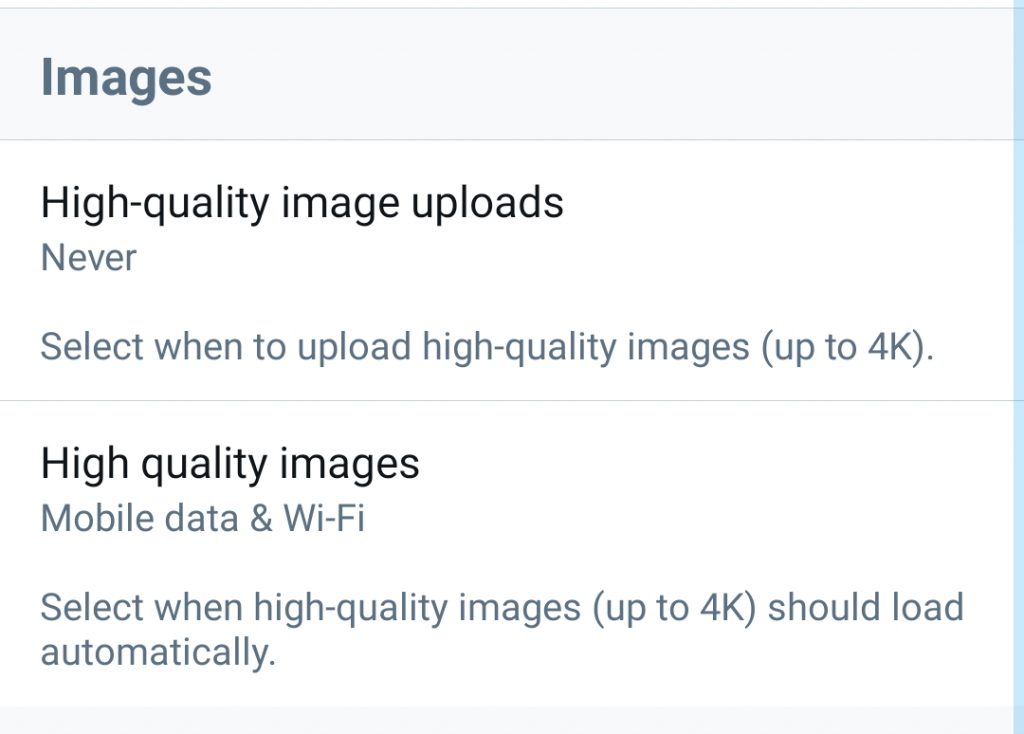
You can also choose if you want to upload 4K images on Wi-Fi or cellular. The option is similar to those available for high-resolution videos that Twitter plays automatically.
Feature image: Unsplash/Joshua Hoehne
Read more: Instagram adds tools to Direct Messages to prevent harassment